
Node SDK Quick Start

Time: ~5 minutes | Difficulty: Beginner

What Is the Node SDK?

The Node SDK lets you control TagadaPay from your server. Think of it as the backend counterpart to the Plugin SDK — while the Plugin SDK builds the checkout UI, the Node SDK manages everything behind it.
┌──────────────────────────────────────────────┐
│  Your server / script / CI pipeline          │
│                    ↓                         │
│  @tagadapay/node-sdk                         │
│                    ↓                         │
│  TagadaPay REST API                          │
│    • Create stores & products                │
│    • Deploy checkout pages                   │
│    • Set up multi-step funnels               │
│    • Process & route payments across PSPs    │
│    • Manage subscriptions & customers        │
└──────────────────────────────────────────────┘
Why use the Node SDK? If you’re an AI agent, a CI/CD pipeline, a custom backend, or just prefer code over dashboards — this is how you talk to TagadaPay programmatically.

Prerequisites

RequirementHow to get it
Node.js 18+nodejs.org — run node --version to check
TagadaPay accountSign up at app.tagadapay.com
API keyDashboard → Settings → Access Tokens → create one

Finding Your API Key

Your API key is a UUID (e.g. 2f681d1d-xxxx-xxxx-xxxx-xxxxxxxxxxxx). To find or create one:
  1. Click your avatar in the top-right corner and select Settings
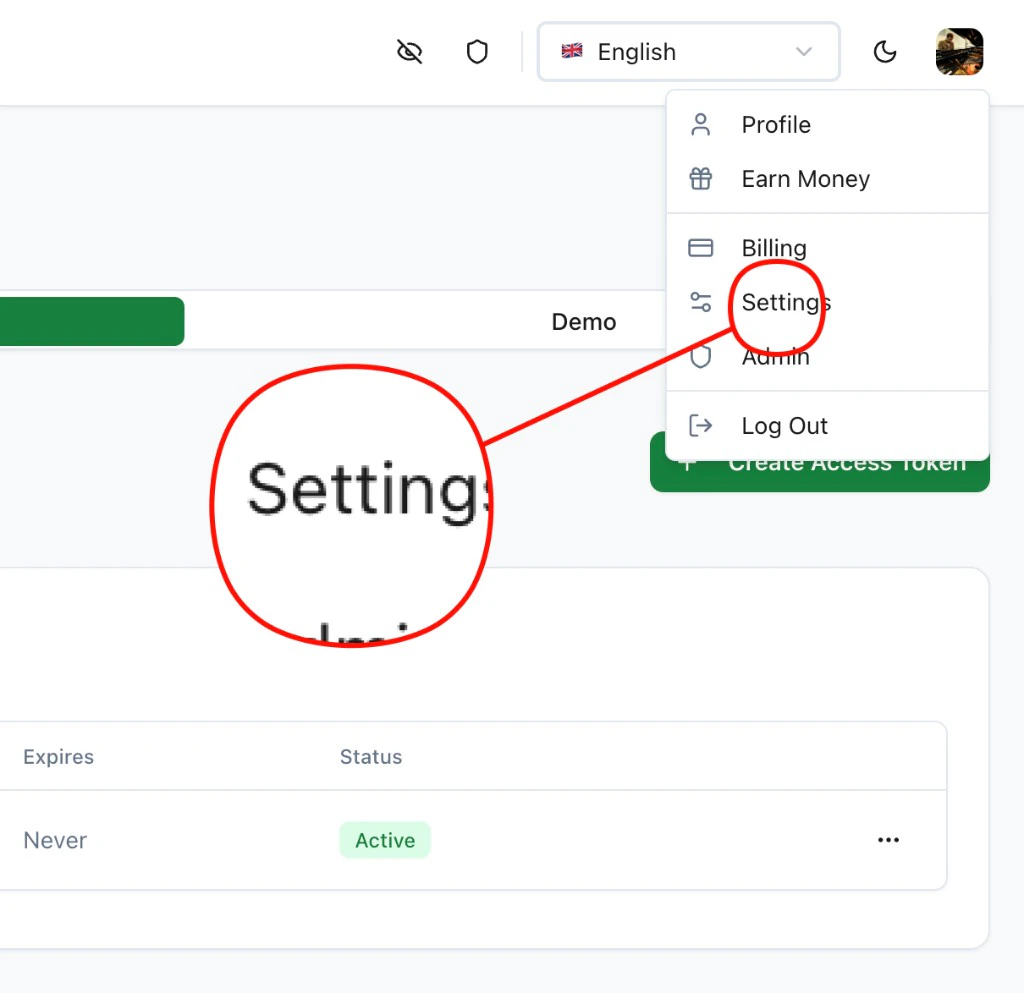
Navigate to Settings from the user menu
  1. Go to the Access Tokens tab and copy your API key (or click + Create Access Token to generate a new one)
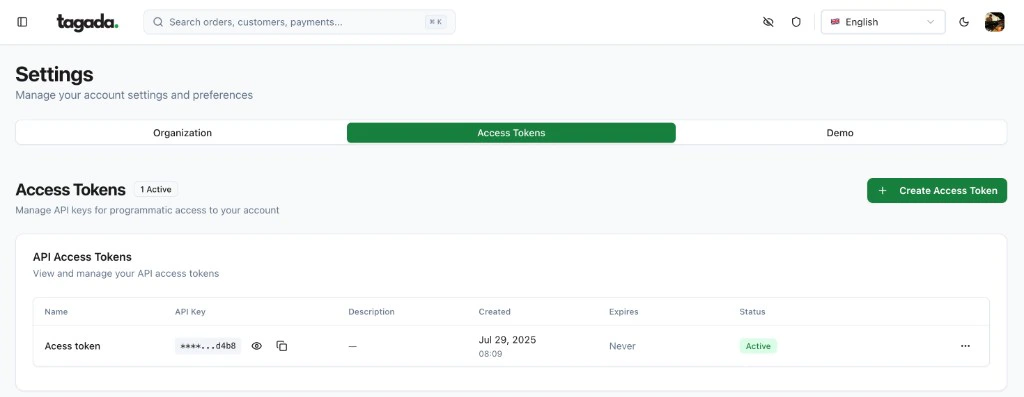
Access Tokens page in Settings

Install

npm install @tagadapay/node-sdk

Initialize

import Tagada from '@tagadapay/node-sdk';

const tagada = new Tagada('your-api-key');
That’s it. Every resource is now available via tagada.<resource>.

Example: Full Checkout Setup in 7 Steps

This script creates a processor, payment flow, store, product, and funnel — activates the checkout — then generates a checkout session link. No plugin deployment needed; TagadaPay’s native checkout is auto-injected.
import Tagada from '@tagadapay/node-sdk';
const tagada = new Tagada('your-api-key');

// 1. Create a sandbox processor (or use 'stripe', 'nmi', etc.)
const { processor } = await tagada.processors.create({
  processor: {
    name: 'Sandbox', type: 'sandbox', enabled: true,
    supportedCurrencies: ['USD'], baseCurrency: 'USD',
    options: { testMode: true },
  },
});

// 2. Create a payment flow
const flow = await tagada.paymentFlows.create({
  data: {
    name: 'Default', strategy: 'simple',
    fallbackMode: false, maxFallbackRetries: 0,
    threeDsEnabled: false, stickyProcessorEnabled: false,
    pickProcessorStrategy: 'weighted',
    processorConfigs: [{ processorId: processor.id, weight: 100, disabled: false, nonStickable: false }],
    fallbackProcessorConfigs: [], abuseDetectionConfig: null,
  },
});

// 3. Create a store with the payment flow
const store = await tagada.stores.create({
  name: 'My Store', baseCurrency: 'USD',
  presentmentCurrencies: ['USD', 'EUR'], chargeCurrencies: ['USD'],
  selectedPaymentFlowId: flow.id,
});

// 4. Create a product
const product = await tagada.products.create({
  storeId: store.id, name: 'Premium Plan', active: true,
  variants: [{
    name: 'Monthly', sku: 'premium-monthly', grams: 0,
    price: 2999, compareAtPrice: 0, active: true, default: true,
    prices: [{ currencyOptions: { USD: { amount: 2999 } }, recurring: false, billingTiming: 'in_advance', default: true }],
  }],
});
const variantId = product.variants[0].id;

// 5. Create a funnel (native checkout auto-injected)
const funnel = await tagada.funnels.create({
  storeId: store.id,
  config: {
    id: 'my-checkout', name: 'My Checkout', version: '1.0.0',
    nodes: [
      { id: 'step_checkout', name: 'Checkout', type: 'checkout', kind: 'step', isEntry: true, position: { x: 0, y: 0 }, config: { path: '/checkout' } },
      { id: 'step_thankyou', name: 'Thank You', type: 'thankyou', kind: 'step', position: { x: 300, y: 0 }, config: { path: '/thankyou' } },
    ],
    edges: [{ id: 'e1', source: 'step_checkout', target: 'step_thankyou' }],
  },
  isDefault: true,
});

// 6. Activate (mounts routes, checkout goes live)
const result = await tagada.funnels.update(funnel.id, {
  storeId: store.id, config: funnel.config,
});

const funnelCheckoutUrl = result.funnel.config.nodes
  .find(n => n.id === 'step_checkout').config.url;
console.log('Funnel live at:', funnelCheckoutUrl);

// 7. Create a checkout session — shareable link with pre-loaded cart
const session = await tagada.checkout.createSession({
  storeId: store.id,
  items: [{ variantId, quantity: 1 }],
  currency: 'USD',
  checkoutUrl: funnelCheckoutUrl,
});
console.log('Checkout link:', session.redirectUrl);
For a detailed walkthrough of each step, see the Merchant Quick Start. For deploying your own pages (checkout, landing, offers) instead of the native checkout, see Funnel Pages.

Available Resources

Every resource follows the same patterns: list, retrieve, create, update, del.
ResourceExamples
tagada.stores.list(), .create(...), .retrieve(id)
tagada.products.list(...), .create(...), .update(...)
tagada.payments.list(...), .process(...), .refund(...), .void(...)
tagada.paymentFlows.create(...), .listWithProcessors() — define how payments cascade across PSPs
tagada.funnels.create(...), .update(id, ...) — multi-step flows with auto-routing
tagada.plugins.deploy(...), .instantiate(...), .mount(...) — host pages on TagadaPay’s CDN
tagada.subscriptions.create(...), .cancel(...), .changeProcessor(...)
tagada.customers.list(...), .retrieve(id)
tagada.orders.list(...), .retrieve(id)
tagada.webhooks.create(...), .list(...)
tagada.checkout.createSession(...), .pay(...) — create checkout links and process payments server-side
tagada.processors.list(), .create(...), .retrieve(id), .update(...), .del([ids]) — manage PSP connections
tagada.domains.add(...), .list()

Payment Flows: The Core of TagadaPay

TagadaPay is PSP-agnostic. You connect multiple processors (Stripe, Adyen, NMI, etc.) and define payment flows that route transactions intelligently.
const flow = await tagada.paymentFlows.create({
  data: {
    name: 'US Primary',
    strategy: 'cascade',
    fallbackMode: true,
    maxFallbackRetries: 3,
    pickProcessorStrategy: 'weighted',
    processorConfigs: [
      { processorId: 'proc_stripe', weight: 60 },
      { processorId: 'proc_adyen', weight: 40 },
    ],
    fallbackProcessorConfigs: [
      { processorId: 'proc_nmi', orderIndex: 0 },
    ],
  },
});
60% of traffic goes to Stripe, 40% to Adyen. If both fail, NMI picks up the payment. All automatic.

Error Handling

The SDK throws typed errors you can catch individually:
import Tagada, {
  TagadaNotFoundError,
  TagadaValidationError,
  TagadaAuthenticationError,
  TagadaRateLimitError,
} from '@tagadapay/node-sdk';

try {
  await tagada.payments.retrieve('pay_nonexistent');
} catch (err) {
  if (err instanceof TagadaNotFoundError) {
    // 404 — resource doesn't exist
  } else if (err instanceof TagadaValidationError) {
    console.log(err.errors); // [{ field: 'amount', message: 'Required' }]
  } else if (err instanceof TagadaRateLimitError) {
    console.log(`Retry after ${err.retryAfter}s`);
  }
}
Retries on 429, 5xx, and network errors are automatic (configurable via maxRetries).

Configuration

const tagada = new Tagada({
  apiKey: 'your-api-key',
  baseUrl: 'https://app.tagadapay.com/api/public/v1', // default
  timeout: 30_000,   // request timeout
  maxRetries: 2,     // auto-retry on failure
  apiVersion: '2025-01-01',
});
Pass an idempotencyKey to safely retry mutations:
await tagada.payments.process(params, { idempotencyKey: 'unique-key-123' });

TypeScript

Fully typed. Import any type you need:
import type { Payment, Customer, Subscription, TagadaList } from '@tagadapay/node-sdk';

Next Steps

Multi-Stripe Routing & Vault

Connect multiple Stripe accounts, vault cards, and cascade transactions

Scripts & Pixels per Step

Add Meta, TikTok, GTM pixels and custom scripts to each funnel step

Funnel Orchestrator

Deep dive into multi-step funnels with routing, A/B testing, and analytics

Deploy & A/B Test

Deploy pages and run split tests via the REST API

API Reference

Full REST API documentation